Every paid trading journal will tell you the same thing: $49 a month is a rounding error against the trades it'll save you. They are not entirely wrong. They are also not telling you that $49 a month compounds to $1,764 over three years, that none of the major platforms include true Apex 4.0 drawdown tracking on their base tier, and that the most expensive part of failing a prop firm evaluation has never been the journal you didn't use — it's the rule you didn't know was about to ratchet against you.
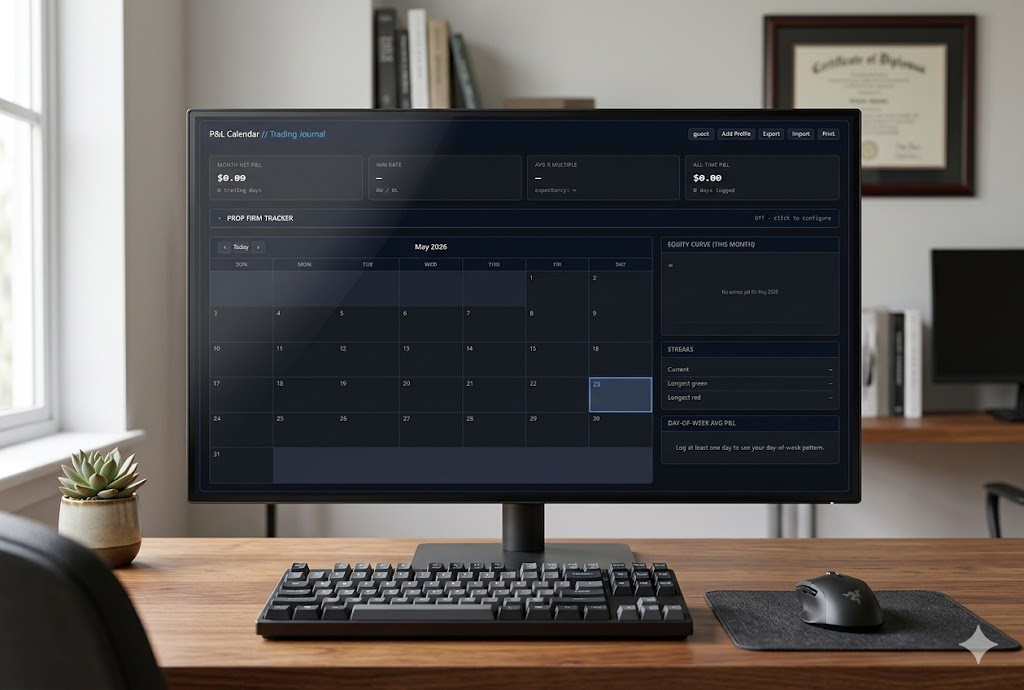
We built a free trading journal and P&L calendar that addresses both problems at once. It lives at trailingstoploss.com/pnl-calendar/, requires no signup, and has built-in drawdown tracking for Apex Trader Funding, Topstep, FTMO, and MyFundedFutures. This article walks through why the paid-journal economics don't actually work for most prop traders, what features actually matter in a journal, and what we did differently.
The cost problem nobody calculates correctly
Tradezella, the most-recommended paid journal in the prop trading community, currently runs $29 per month for its Basic plan and $49 per month for Pro. Annual billing brings it down to $24 or $33.25 respectively, with no free trial and no published refund policy on month-to-month subscriptions. Tradervue offers a free tier capped at 100 trades per month — which most active futures traders blow through in two weeks — then jumps to $29.95+ for unlimited usage. TraderSync's Pro tier sits around $29.95/month, with proactive AI coaching gated behind their $79.95/month Elite plan. All three platforms are genuinely capable; none of them are cheap if you're paying them for years, which you should be.
Three years is not a hypothetical. Three years is the minimum honest timeframe for serious journaling to pay off. A few weeks of logged trades produces noise; a few months produces directional hints; a few years produces actual edge data — which is the entire point. The traders who get the most out of a journal are the ones who maintain it through losing streaks, prop firm failures, market regime changes, and personal life chaos. Paying $588 a year for that discipline is fine if you can afford it. Paying $588 a year while also paying $150 to $300 for prop firm evaluations every time you fail one is how a lot of would-be prop traders go broke before they ever get funded. Prop firm economics are brutal enough without subscription stacking.
What makes this worse: every major paid journal markets itself as essential for prop firm traders specifically — and yet drawdown tracking that actually understands prop firm rules is either missing, broken, or gated behind the highest tier. Tradezella has a "prop firm account management" feature that doesn't model trailing drawdown correctly for Apex 4.0. TraderSync handles it but only on Premium. The piece prop traders need most is the part the paid tools deliver least. That gap is exactly what the free version we built was designed to fill.
What actually matters in a trading journal
Strip away the marketing copy and the AI gimmicks. A trading journal needs to do four things well. Most do one or two and charge you for the marketing department.
1. Log the trade in a way you'll actually review later
Auto-import of 247 trade rows that you'll never look at again is not journaling — it's data hoarding. The act of typing your numbers and your notes after the close is the journaling. It forces reflection, surfaces emotional patterns you'd otherwise forget, and turns a trading day into a teaching moment. The trading psychology research is unanimous on this: traders systematically misremember their own emotional state when reviewing from memory days later. The journal exists to outsource memory to a system that doesn't lie.
2. Surface patterns you can't see in real time
Day-of-week effects. Setup performance. Time-of-day skew. Emotion vs. P&L correlation. Most traders have at least one persistent pattern bleeding their account, and they cannot see it in real time. They can see it in 30 days of properly tagged journal entries. A heatmap that shows Thursday is consistently your worst day is worth more than a year of generic "improve your discipline" advice.
3. Track prop firm rules without doing the math by hand
Apex 4.0's trailing drawdown locks at starting balance plus $100. Topstep's locks at starting balance exactly. FTMO uses static 10%. MyFundedFutures uses EOD trailing. Every firm is different, every account size is different, and the math changes every time you have a winning day. Doing this manually in your head while sizing your next trade is how funded accounts blow up. Apex itself publishes a help-center article explaining the EOD trailing mechanics, and traders still get it wrong. It needs to live in the journal.
4. Survive your habits
The journal has to work the way you actually work. Open on your phone at 4pm when you remember you forgot to log Tuesday. Available offline on a plane. Not blocked behind a forgotten password. Not held hostage by a subscription you forgot to renew. Not gone because the company shut down. When a SaaS journal disappears or hikes prices, your three years of journal entries go with it.
What we built (and why it costs nothing)
The TSL P&L Calendar is a free trading journal that runs entirely in your browser. No account required. No broker connection. No data leaves your device. The same tool, the same features, no tiers — and it covers the four things above directly.
Prop Firm Drawdown Tracker
Live buffer for Apex 4.0, Topstep, FTMO, MyFundedFutures, and custom rules. Shows your trailing floor, profit target progress, and consistency status in real time as you log days.
P&L Calendar
Color-coded daily grid. Green winning days, red losing days, grey breakeven. Scan a month in three seconds.
R-Multiple & Expectancy
Average R per trade and dollar expectancy per day. The two numbers that tell you whether your edge is real over 50+ days.
Day-of-Week Heatmap
Bipolar bar chart of average P&L by weekday. Find the day quietly draining your account — it's almost never the one you'd guess.
Equity Curve
Running monthly P&L as a clean SVG curve. No telemetry, no charting library — just your numbers.
Streak Tracker
Current green/red streak plus your longest-ever runs. Doubles as a built-in tilt detector.
Emotion Tagging
Eight presets including FOMO, revenge, tilted, and greedy — the honest ones. Cross-reference against P&L later for humbling results.
Multi-Profile Support
Track separate journals for personal, Apex challenge, and Topstep funded — all on the same device, all separated cleanly.
Installable as an App
Progressive Web App — install on iPhone, Android, or desktop without an app store. Works fully offline.
Print-Ready Reports
One-click monthly report for taxes, coaching sessions, or prop firm appeals. Saves as PDF in any browser.
JSON Export & Import
Full backup in seconds. Move your journal to any device. Never get locked in.
Local-First Privacy
Everything in your browser's localStorage. No server, no analytics, no broker API keys. Your data is yours.
How it stacks up against the paid tools
Below is an honest comparison. Paid tools beat the free version on broker auto-import and trade replay; we beat them on price, privacy, and prop firm drawdown logic. The right answer depends on what you actually need.
| Feature | TSL P&L Calendar | Tradezella Pro | Tradervue Free | TraderSync Pro |
|---|---|---|---|---|
| Price (3 years) | $0 | $1,764 | $0 (100 trades/mo cap) | $1,078 |
| Apex 4.0 drawdown tracker | Built-in, correct math | Generic prop firm view | No | Premium tier |
| Topstep trailing MLL logic | Yes — locks at start balance | Generic | No | Premium tier |
| Free tier with full features | Yes — no caps, no trial | No free tier | 100 trades/mo cap | 7-day trial only |
| Data stays on your device | Yes — localStorage | Cloud-stored | Cloud-stored | Cloud-stored |
| Works offline | Yes | No | No | No |
| Installable as PWA | Yes | Web only | Web only | Mobile apps |
| Broker auto-import | Manual only | 25+ brokers | 80+ brokers | Multiple brokers |
| Trade replay | No | Best-in-class | No | Yes |
| AI coaching insights | No | Zella AI | No | Cypher AI (capped) |
If you scalp 200+ trades a day and would actually use trade replay to review individual entries — Tradezella or TraderSync makes sense and is worth the money. If you're a swing trader, futures day trader running 1-5 setups a day, or a prop firm challenger trying to pass an evaluation — you don't need auto-import, you don't need AI gimmicks, and you definitely don't need to pay $1,764 over three years for what amounts to a glorified spreadsheet with charts. You need the four things listed earlier, done well, in a tool that respects your time and your wallet.
Visualizing the three-year math
If a picture helps: here's what $49/month compounds to over a serious journaling timeframe, set against the alternative.
Why prop firm tracking specifically is missing from paid journals
Here's the part that's puzzled us for a while. Apex Trader Funding alone has hundreds of thousands of funded and evaluation accounts active. Topstep, FTMO, MyFundedFutures, MyFundedFx, TradeDay, BluSky, Take Profit Trader — collectively the prop firm space is the single largest growth segment in retail trading. And every major paid journal markets itself heavily to prop traders. Yet drawdown logic that actually understands each firm's specific rules is consistently the weakest feature in those products.
Part of it is a moving target problem. Apex overhauled its entire ruleset in March 2026 (Apex 4.0), including new EOD vs. Intraday trailing options and a $100 lock offset. Topstep rolled out Express Funded Accounts with different trailing logic than the original Combine. FTMO has tweaked profit targets multiple times. Building a generic "prop firm tracker" that works across all of them, with the correct math for each, is genuinely harder than auto-importing a Thinkorswim CSV.
Part of it is product strategy. Auto-import and trade replay are flashy features that justify subscription prices in a demo video. Drawdown buffer logic is back-office plumbing that doesn't sell. It's the kind of feature you only appreciate after you've blown a $150 Apex evaluation because you didn't realize Monday's profit raised your floor by $1,800. Which is exactly the moment when paying $49/month for a tool that doesn't track it correctly starts to feel like adding insult to injury.
Try the free P&L Calendar →
Apex 4.0, Topstep, FTMO, and MyFundedFutures drawdown tracking. No signup. Installable as an app. Works offline. Built by traders who got tired of paying $49 a month for a glorified spreadsheet.
Open the calendarHonest limitations (because every tool has them)
Two things to be straight about before you switch.
1. No broker auto-import. Every entry is manual. This is intentional — the daily act of typing your numbers is the journaling — but if you genuinely cannot manually log a daily summary and need broker connectivity, the free tool isn't the answer. Tradezella and TraderSync do this better, and that's worth their price tag for high-frequency traders.
2. Intraday drawdown isn't visible. The prop firm tracker reads your closed daily P&L. If you went +$2,000 then closed at +$500, the tracker only sees +$500. For firms that use true intraday trailing (Apex Intraday, Topstep Combine), the tracker's floor is a conservative approximation. For exact intraday positioning, your firm's official dashboard is still the ground truth. This is a limitation of being a free, browser-based, no-broker-connection tool — and it's the same limitation Excel has if you build your own.
Everything else paid tools do — color-coded calendars, equity curves, streak tracking, R-multiples, expectancy, day-of-week analysis, emotion tagging, monthly summaries — the free version does too, and runs offline on your phone.
Getting started in 60 seconds
Go to trailingstoploss.com/pnl-calendar/. Click any date on the calendar. Type your P&L for that day, your R-multiple, the setup you used, how you felt, and any notes. Save. That's it — your journal is alive.
If you're on a prop firm evaluation, click the Prop Firm Tracker panel, pick your firm and account size, set your start date, and the buffer math runs automatically. If you trade on both phone and desktop, use the Export button after each session to back up; the JSON file is portable. If you want it on your home screen, the install prompt appears after your first entry — or use your browser's Share menu on iOS, three-dot menu on Android.
It will not make you profitable by itself — no journal will. It will give you the data and structure you need to make better decisions, and it will not charge you $588 a year for the privilege. The discipline of journaling is the value; the software is just the container.
Frequently asked questions
Is the P&L Calendar really free, or is there a paid tier later?
Truly free, no paid tier planned. No signup, no credit card, no ads, no email capture, no upsell. The hosted version runs in your browser at trailingstoploss.com/pnl-calendar/ and the source can be downloaded as a single HTML file. Compared to Tradezella's $29-$49 monthly tiers or Tradervue's 100-trade-per-month free cap, this one is genuinely uncapped.
Does it really track Apex 4.0 drawdown correctly?
Yes. The math accounts for Apex 4.0's specific rules — including the $100 lock offset, EOD vs. Intraday trailing variants, and the published account sizes from 25K through 150K. Apex's March 2026 ruleset is supported; legacy Apex rules (pre-4.0) are not, since those accounts can no longer be purchased anyway. Apex's own help-center pages are the authoritative reference; the tracker is a planning aid to keep you aware between sessions.
What's the catch with "data stays in your browser"?
The catch is that data does not sync across devices automatically. If you log entries on your desktop and open the app on your phone, your phone sees an empty journal — because localStorage is per-device. The Export button downloads a JSON backup that you can Import on the other device. It's an extra step, but the tradeoff is that your trading data never lives on someone else's server, and the tool keeps working even if we shut down the website tomorrow.
Why no broker auto-import?
Two reasons. Practical: building and maintaining broker integrations across Thinkorswim, IBKR, NinjaTrader, Tradovate, Rithmic, and so on is a substantial engineering effort that would require a paid tier to fund. Philosophical: auto-importing 200+ trade rows into a journal you never read defeats the point of journaling. The daily act of typing your numbers is the reflection that actually changes behavior. If you genuinely scalp at volume and need automation, Tradezella or TraderSync is built for you and worth their price tag.
Can I use it for my taxes or prop firm appeals?
Yes. The Print button generates a clean light-theme monthly report that fits on one page — with stats, calendar, equity curve, and streaks. Print it physically or save as PDF (every modern browser does this from the print dialog). Useful for accountant handoff, coaching reviews, or appealing a prop firm rule violation.
What if I'm on a prop firm not in the dropdown list?
Pick "Custom Rules" from the firm dropdown. Enter your starting balance, max drawdown, daily loss limit, and profit target manually. The tracker then computes your buffer using those custom numbers. Works for TradeDay, BluSky, Take Profit Trader, MyFundedFx, personal account caps, and anything else with a defined drawdown structure.
How is this different from a free Excel template?
Excel templates require you to maintain the formulas, build the charts, and update the drawdown math every time Apex changes its rules. They don't install as an app, don't work on mobile, don't generate clean PDF reports, and don't auto-update if a prop firm changes a rule. They're free, sure, and they work — but they are not zero-effort the way a purpose-built tool is.